Friday, February 7, 2014

Everything you need to know about wireless charging.


How does wireless charging work?

Wireless charging, also known as inductive charging, is a convenient and fuss-free way to power up your smartphone. Wireless chargers emit an alternating current via a transmitter coil, which then induces a voltage in the receiver coil found in the device. Qi (pronounced “chee”) wireless charging pads are capable of charging smartphones, tablets, Bluetooth® headsets, cameras and portable power packs. Note: You do need one of these pads for wireless charging; a smartphone that says it has wireless charging capability will not charge itself. At least, not yet anyway. But wireless charging is simple: Just plug in the charging pad and place your device on it. That’s it!

How do you know if your smartphone is Qi compatible?

If you have a wireless charger from Verizon, your smartphone must be Qi compatible; all wireless charging accessories sold by Verizon are Qi certified. So how do you know if your phone is Qi compatible? Your device should have a Qi logo on it somewhere, so be sure to check the packaging, the case and the manual. The icon is easy to identify—it looks like a magnifying glass focusing in on the letter ‘i’. The magnifying glass is cleverly in the shape of the letter Q. For example, the new Droid Maxx by Motorola and Droid Mini by Motorola are ready for wireless charging right out of the package.

Can you charge a smartphone with a case on it? Do you need a special case?

This answer truly depends on the device. The Nokia Lumia 928, Droid DNA by HTC and Windows Phone 8X by HTC can be charged wirelessly with any case on, but other smartphones from Verizon require a special, device-specific wireless charging back cover. The Samsung Galaxy S® 4 is only ready for wireless charging when you add the Samsung Galaxy S 4 Wireless Charging Cover. You can find this information in your device’s manual, at verizonwireless.com or on the manufacturer website. Here you can find a list of all the Verizon Wireless smartphones that are equipped with compatibility for wireless charging.

How do you set it up?

Once you’ve determined if your device is Qi compatible and whether or not you need a special cover, you’re ready to charge. One of the beauties of wireless charging—and yes, we realize there are many—is how easy it really is. Simply plug in the charging dock and place your device on the charging pad. Then, watch your device juice up. It’s actually that simple.

What do you look for when purchasing a wireless charger?

When you’re researching chargers to ensure you make the right purchase, there are a few things to consider. Do you want something that is discreet? The LG Wireless Charging Pad may be compact, but it still packs a lot of charging power. It’s sleek and will stay out of the way, plus its size makes it easy to carry and take with you.

Do you want something that can charge and play music? Then the Nokia JBL PowerUp Speaker is probably right for you. This wireless Bluetooth® charger does double duty as it charges and blasts your favorite music.

Do you want something that matches your decor? The TYLT VÜ Wireless Charger comes in red, green, blue or black so you can find the charger to match your style, plus it holds your smartphone at an angle so you can easily look at the screen to follow recipes or stream videos while charging.

Do you want something that’s a little more fun? The funky Nokia Wireless Charging Pillow by Fatboy® has a “pillowcase” for your smartphone and is unlike any other wireless charger out there in terms of style.

Do you want a charger that will notify you when your device is fully juiced up? The charging indicator light on the Nokia Wireless Charging Plate DT-900 will let you know when your device is fully powered. It’s available in black or white and has a sleek and functional design.

When your friends see you powering up your devices on your new wireless charger, they’ll probably ask you, “How does wireless charging work?” Now you’ll have the answers.


Visit Us : @ Hyperjet


Wednesday, February 5, 2014

How Facial Recognition Systems Work


A newly-emerging trend in facial recognition software uses a 3D model, which claims to provide more accuracy. Capturing a real-time 3D image of a person's facial surface, 3D facial recognition uses distinctive features of the face -- where rigid tissue and bone is most apparent, such as the curves of the eye socket, nose and chin -- to identify the subject. These areas are all unique and don't change over time.

Using depth and an axis of measurement that is not affected by lighting, 3D facial recognition can even be used in darkness and has the ability to recognize a subject at different view angles with the potential to recognize up to 90 degrees (a face in profile).
Using the 3D software, the system goes through a series of steps to verify the identity of an individual.

Detection

Acquiring an image can be accomplished by digitally scanning an existing photograph (2D) or by using a video image to acquire a live picture of a subject (3D).

Alignment

Once it detects a face, the system determines the head's position, size and pose. As stated earlier, the subject has the potential to be recognized up to 90 degrees, while with 2D, the head must be turned at least 35 degrees toward the camera.

Measurement


The system then measures the curves of the face on a sub-millimeter (or microwave) scale and creates a template.

Representation

The system translates the template into a unique code. This coding gives each template a set of numbers to represent the features on a subject's face.

Matching

If the image is 3D and the database contains 3D images, then matching will take place without any changes being made to the image. However, there is a challenge currently facing databases that are still in 2D images. 3D provides a live, moving variable subject being compared to a flat, stable image. New technology is addressing this challenge. When a 3D image is taken, different points (usually three) are identified. For example, the outside of the eye, the inside of the eye and the tip of the nose will be pulled out and measured. Once those measurements are in place, an algorithm (a step-by-step procedure) will be applied to the image to convert it to a 2D image. After conversion, the software will then compare the image with the 2D images in the database to find a potential match.

Verification or Identification

In verification, an image is matched to only one image in the database (1:1). For example, an image taken of a subject may be matched to an image in the Department of Motor Vehicles database to verify the subject is who he says he is. If identification is the goal, then the image is compared to all images in the database resulting in a score for each potential match (1:N). In this instance, you may take an image and compare it to a database of mug shots to identify who the subject is.
 

Facial Recognition Systems Uses


In the past, the primary users of facial recognition software have been law enforcement agencies, who used the system to capture random faces in crowds. Some government agencies have also been using the systems for security and to eliminate voter fraud. The U.S. government has recently begun a program called US-VISIT (United States Visitor and Immigrant Status Indicator Technology), aimed at foreign travelers gaining entry to the United States. When a foreign traveler receives his visa, he will submit fingerprints and have his photograph taken. The fingerprints and photograph are checked against a database of known criminals and suspected terrorists. When the traveler arrives in the United States at the port of entry, those same fingerprints and photographs will be used to verify that the person who received the visa is the same person attempting to gain entry.

However, there are now many more situations where the software is becoming popular. As the systems become less expensive, making their use more widespread. They are now compatible with cameras and computers that are already in use by banks and airports. The TSA is currently working on and testing out its Registered Traveler program. The program will provide speedy security screening for passengers who volunteer information and complete a security threat assessment. At the airport there will be specific lines for the Registered Traveler to go through that will move more quickly, verifying the traveler by their facial features.

Other potential applications include ATM and check-cashing security. The software is able to quickly verify a customer's face. After a customer consents, the ATM or check-cashing kiosk captures a digital image of him. The FaceIt software then generates a faceprint of the photograph to protect customers against identity theft and fraudulent transactions. By using the facial recognition software, there's no need for a picture ID, bankcard or personal identification number (PIN) to verify a customer's identity. This way businesses can prevent fraud from occurring.

While all the examples above work with the permission of the individual, not all systems are used with your knowledge. In the first section we mentioned that systems were used during the Super Bowl by the Tampa Police, and in Ybor City. These systems were taking pictures of all visitors without their knowledge or their permission. Opponents of the systems note that while they do provide security in some instances, it is not enough to override a sense of liberty and freedom. Many feel that privacy infringement is too great with the use of these systems, but their concerns don't end there. They also point out the risk involved with identity theft. Even facial recognition corporations admit that the more use the technology gets, the higher the likelihood of identity theft or fraud.
As with many developing technologies, the incredible potential of facial recognition comes with some drawbacks, but manufacturers are striving to enhance the usability and accuracy of the systems.


Visit Us : @ Hyperjet

Sunday, February 2, 2014

How do fiber optic cables work?


Fiber optics (optical fibers) are long, thin strands of very pure glass about the diameter of a human hair. They are arranged in bundles called optical cables and used to transmit light signals over long distances.
If you look closely at a single optical fiber, you will see that it has the following parts:
  • Core - Thin glass center of the fiber where the light travels 
  •  Cladding - Outer optical material surrounding the core that reflects the light back into the core
  • Buffer coating - Plastic coating that protects the fiber from damage and moisture


Hundreds or thousands of these optical fibers are arranged in bundles in optical cables. The bundles are protected by the cable's outer covering, called a jacket.
  • Optical fibers come in two types:
  • Single-mode fibers
  •  Multi-mode fibers

Single-mode fibers have small cores (about 3.5 x 10⁻⁴ inches or 9 microns in diameter) and transmit infrared laser light (wavelength = 1,300 to 1,550 nanometers). Multi-mode fibers have larger cores (about 2.5 x 10⁻³ inches or 62.5 microns in diameter) and transmit infrared light (wavelength = 850 to 1,300 nm) from light-emitting diodes (LEDs).
Some optical fibers can be made from plastic. These fibers have a large core (0.04 inches or 1 mm diameter) and transmit visible red light (wavelength = 650 nm) from LEDs.


How Does an Optical Fiber Transmit Light?


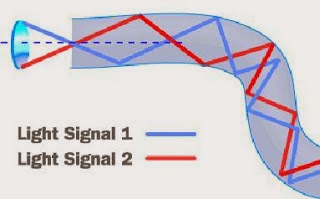
Suppose you want to shine a flashlight beam down a long, straight hallway. Just point the beam straight down the hallway -- light travels in straight lines, so it is no problem. What if the hallway has a bend in it? You could place a mirror at the bend to reflect the light beam around the corner. What if the hallway is very winding with multiple bends? You might line the walls with mirrors and angle the beam so that it bounces from side-to-side all along the hallway. This is exactly what happens in an optical fiber.
The light in a fiber-optic cable travels through the core (hallway) by constantly bouncing from the cladding (mirror-lined walls), a principle called total internal reflection. Because the cladding does not absorb any light from the core, the light wave can travel great distances.
However, some of the light signal degrades within the fiber, mostly due to impurities in the glass. The extent that the signal degrades depends on the purity of the glass and the wavelength of the transmitted light (for example, 850 nm = 60 to 75 percent/km; 1,300 nm = 50 to 60 percent/km; 1,550 nm is greater than 50 percent/km). Some premium optical fibers show much less signal degradation -- less than 10 percent/km at 1,550 nm.


Advantages of Fiber Optics

Why are fiber-optic systems revolutionizing telecommunications? Compared to conventional metal wire (copper wire), optical fibers are:
Less expensive - Several miles of optical cable can be made cheaper than equivalent lengths of copper wire. This saves your provider (cable TV, Internet) and you money. Thinner - Optical fibers can be drawn to smaller diameters than copper wire. Higher carrying capacity - Because optical fibers are thinner than copper wires, more fibers can be bundled into a given-diameter cable than copper wires. This allows more phone lines to go over the same cable or more channels to come through the cable into your cable TV box.Less signal degradation - The loss of signal in optical fiber is less than in copper wire. Light signals - Unlike electrical signals in copper wires, light signals from one fiber do not interfere with those of other fibers in the same cable. This means clearer phone conversations or TV reception. Low power - Because signals in optical fibers degrade less, lower-power transmitters can be used instead of the high-voltage electrical transmitters needed for copper wires. Again, this saves your provider and you money. Digital signals - Optical fibers are ideally suited for carrying digital information, which is especially useful in computer networks. Non-flammable - Because no electricity is passed through optical fibers, there is no fire hazard.Lightweight - An optical cable weighs less than a comparable copper wire cable. Fiber-optic cables take up less space in the ground. Flexible - Because fiber optics are so flexible and can transmit and receive light, they are used in many flexible digital cameras for the following purposes:
  • Medical imaging - in bronchoscopes, endoscopes, laparoscopes
  • Mechanical imaging - inspecting mechanical welds in pipes and engines (in airplanes, rockets, space shuttles, cars)
  •  Plumbing - to inspect sewer lines

Because of these advantages, you see fiber optics in many industries, most notably telecommunications and computer networks. For example, if you telephone Europe from the United States (or vice versa) and the signal is bounced off a communications satellite, you often hear an echo on the line. But with transatlantic fiber-optic cables, you have a direct connection with no echoes.

Visit Us : @ Hyperjet


Popular Posts

Recent Posts

Text Widget